

On this page:
We ran Valkey on an EKS spot instance without persistence. The instance got reclaimed. The container moved to another host with all its in-memory data intact. Try it on a pre-configured Kubernetes cluster in the iximiuz Labs playground.
The spot instance tradeoff
Spot instances are up to 90% cheaper than on-demand. We use them for web servers, CI runners, batch jobs, and anything that can restart from scratch. Valkey is not one of those things. Most Valkey deployments run without persistence because speed is the whole point, so teams design around the loss.
But Valkey grew beyond caching a long time ago. Teams use it for sessions, job queues, rate limiting, pub/sub, and increasingly as the memory layer for AI agents where it holds semantic facts, conversation context, and vector embeddings. None of that can disappear on a spot reclamation, so teams keep paying full price. Stateful means on-demand.
There is no technical reason a stateful workload cannot run on spot. The problem is that when the instance disappears, everything on it disappears too. So we fixed it.
What you lose
When the cloud provider reclaims your spot instance, Valkey loses everything:
          +------------------------------------------------------------+
          | SPOT INSTANCE RECLAIMED                                    |
          |                                                            |
          |   +-----------+                                            |
          |   |  Valkey   | --- container killed --- X                 |
          |   | (memory)  |                                            |
          |   +-----------+                                            |
          |        |                                                   |
          |        +-- All in-memory data ------------ LOST            |
          |        +-- Client connections ------------ DROPPED         |
          |        +-- Pub/sub subscriptions --------- GONE            |
          |        +-- Blocked clients (BLPOP) ------- GONE            |
          |        +-- In-flight transactions -------- GONE            |
          |                                                            |
          |   What happens next:                                       |
          |                                                            |
          |        +-- New Valkey starts ------------- EMPTY           |
          |        +-- Every client reconnects ------- THUNDERING HERD |
          |        +-- Cache is cold ----------------- MISSES          |
          |        +-- Upstream database ------------- SLAMMED         |
          |                                                            |
          +------------------------------------------------------------+
A cache warms up again in a few minutes, but a session store logs out every user, a job queue loses tasks mid-flight, and every pub/sub subscriber disconnects and misses messages until it reconnects.
Then there are the connections: they all drop. Every client has to reconnect, re-authenticate, re-subscribe.
Most teams just avoid spot entirely and run Valkey on on-demand. Safe, but 2-3x the cost. Reserved instances claw most of that back, betting you'll still want that same instance one to three years out. The rest design around the loss: cache invalidation strategies, read-through patterns, warm-up scripts that pre-populate data after a restart. That works for simple caches, but breaks when Valkey holds sessions, job queues, or agent memory that cannot be reconstructed.
Attaching a persistent volume looks like the fix, but EBS volumes are locked to one availability zone and slow to re-attach to a new node. Durable storage surrenders the cross-zone diversity that makes spot cheap, and still costs you minutes of downtime. Either way, a spot reclamation hurts.
Spot reclamations are not sudden crashes though. The cloud provider warns you first: 2 minutes on AWS, 30 seconds on GCP and Azure. That does not sound like much, but Architect needs about 10 seconds to migrate most workloads (it's usually down to network throughput and amount of data that needs to be transferred).
The source node needs to be alive for those seconds. A kernel panic or a sudden power loss takes the process with it, and no migration can help. But sudden death is the minority: spot warns you, drains have grace periods, autoscalers cordon before scaling down. Mature infrastructure usually says goodbye before it goes.
30 seconds is plenty
When a Kubernetes node gets a spot reclamation notice, Architect moves the container to another spot node with all its in-memory data. The container pauses on one host and picks up on another. Yes, a checkpoint travels between the nodes, but it carries the entire running process, not a data dump that a fresh Valkey has to load.
          +------------------------------------------------------------+
          | CONTAINER MIGRATION                                        |
          |                                                            |
          |   Spot Instance (Host A)            Spot Instance (Host B) |
          |                                                            |
          |   +--------+     migrate container      +-------------+    |
          |   | Valkey | =========================> | SAME Valkey |    |
          |   +--------+       memory + data        |  container  |    |
          |                                         +-------------+    |
          |                                                            |
          |   Everything in memory preserved. Zero data loss.          |
          |                                                            |
          |   Clients reconnect to a warm store, not an empty one.     |
          |                                                            |
          +------------------------------------------------------------+
Clients reconnect, but to a store that already has everything. No cold cache, no thundering herd against an empty Valkey.
Compare that to a traditional recovery. We will even be generous and assume RDB persistence was on, so only the writes since the last snapshot are lost:
  TRADITIONAL RECOVERY (RDB SNAPSHOT)

  Detect     Re-attach                                              Load RDB
  failure    EBS (PVC)                                              snapshot
  ~5s        ~30s                                                   ~5s
  |----------|------------------------------------------------------|----------|
  0s                                                                        ~40s

  ARCHITECT MIGRATION

  Freeze    Transfer state  Resume
  <1s       ~3-8s           <1s
  |---------|---------------|--|
  0s                          ~10s
Try it yourself
Do not take our word for it. Run it on your own EKS cluster with the quick start, or try it on a pre-configured cluster on the iximiuz Labs playground. Write your own data, trigger a migration, and see what survives. Try to break it. If you manage, we are most curious to read all about it.
A fresh EKS cluster takes 20+ minutes and costs money. The iximiuz Labs playground is free for up to 1 hour, ready in 3-5 minutes, and just requires GitHub authentication. One caveat: it does not run real spot instances. You drain the node yourself, the same eviction a spot interruption triggers. The migration is real, only the eviction notice is simulated.
If you want to try this on your Kubernetes cluster, Architect works best on EKS with AL2023 nodes. On GKE, use the Ubuntu node image. Other Kubernetes distributions may work, but I cannot promise it: the installer integrates tightly with containerd, and distributions that relocate it, like k3s, need manual surgery first. You also need Kubernetes 1.33+ and at least 2 nodes, or there is nowhere to migrate to.
Add your cluster in the Console and it hands
you a pre-filled helm install. The manifest below gives you migration with
the data intact, plus hibernate and wake.
Start a single Valkey instance with no persistence and no replicas. The annotations are the entire integration: Architect manages the container, hibernates it when idle, and network monitoring wakes it on traffic:
kubectl apply -f - <<EOF
apiVersion: apps/v1
kind: Deployment
metadata:
  name: valkey
  labels:
    app: valkey
spec:
  replicas: 1
  selector:
    matchLabels:
      app: valkey
  template:
    metadata:
      labels:
        app: valkey
      annotations:
        architect.loopholelabs.io/managed-containers: '["valkey"]'
        architect.loopholelabs.io/scaledown-durations: '{"valkey":"10s"}'
        architect.loopholelabs.io/network-monitor: '{"valkey":"packets"}'
    spec:
      runtimeClassName: runc-architect
      containers:
        - name: valkey
          image: valkey/valkey:9
          ports:
            - containerPort: 6379
          resources:
            requests:
              memory: 128Mi
              cpu: 250m
            limits:
              memory: 256Mi
              cpu: 500m
EOF
The 10-second scale-down is demo tuning. Real workloads set their own.
To watch the Valkey hibernation in real-time, run this command in a separate tab:
watch "kubectl get pod -l app=valkey -o custom-columns=\"\
NAME:.metadata.name,\
ARCHITECT:.metadata.labels['status\.architect\.loopholelabs\.io/valkey'],\
CPU:.spec.containers[0].resources.requests.cpu,\
MEM:.spec.containers[0].resources.requests.memory,\
NODE:.spec.nodeName\""
# NAME                      ARCHITECT     CPU   MEM     NODE
# valkey-54d54cc5cb-ncnfj   RUNNING       250m  128Mi   ip-192-168-65-255.us-east-2.compute.internal
# NAME                      ARCHITECT     CPU   MEM     NODE
# valkey-66b95d4575-n7js6   SCALED_DOWN   0     0       ip-192-168-65-255.us-east-2.compute.internal
I find this Console view most helpful to understand how Architect manages workloads:
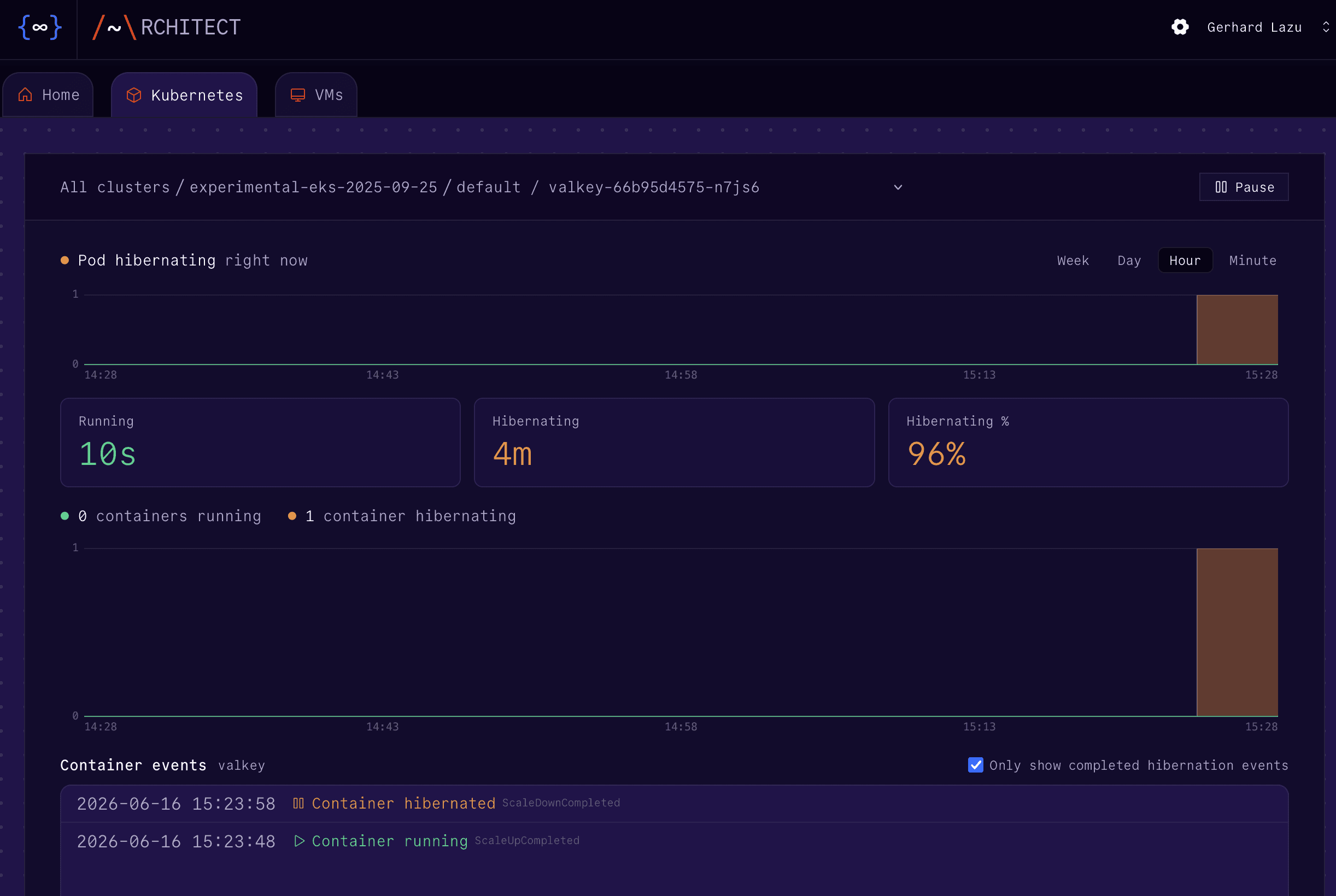
In the iximiuz Labs
playground, the
valkey-cli client & alias are set up, skip next two steps.
On your own cluster, run the commands from a throwaway client pod started from the Valkey image, so nothing has to be installed locally. Give it anti-affinity to Valkey so it never lands on the node you drain later:
kubectl apply -f - <<EOF
apiVersion: v1
kind: Pod
metadata:
  name: valkey-client
spec:
  affinity:
    podAntiAffinity:
      requiredDuringSchedulingIgnoredDuringExecution:
        - labelSelector:
            matchLabels:
              app: valkey
          topologyKey: kubernetes.io/hostname
  containers:
    - name: client
      image: valkey/valkey:9
      command: ["sleep", "infinity"]
EOF
Expose Valkey inside the cluster so the client can reach it by name, then alias
valkey-cli to run inside that pod, so the command examples below work as-is:
kubectl expose deployment valkey --port=6379
alias valkey-cli="kubectl exec valkey-client -- valkey-cli -h valkey"
Now you can write some data, trigger a pod migration, and check that in-memory state persists:
valkey-cli HSET session:u9f3a user_id 4821 \
role admin last_seen "2026-05-28T14:03:00Z"valkey-cli LPUSH jobs:email "send-welcome:4821" "send-invoice:4819"valkey-cli SET agent:ctx:4821 "user prefers weekly summaries, timezone UTC+1"kubectl drain --ignore-daemonsets --delete-emptydir-data \
"$(kubectl get pod -l app=valkey -o jsonpath='{.items[0].spec.nodeName}')"
kubectl rollout status deployment valkeyOn a real EKS cluster, you would not drain by hand. Install the AWS Node Termination Handler so that it catches interruption notice and drains the node for you (same as we did above).
If you still have the watch Valkey command running, you will see it migrate to another node, and then hibernate. Alternatively, in the Console:
- Click on the new pod
- Uncheck
Only show completed hibernation events - Click on the
Checkpoint downloadedentry to see the following:
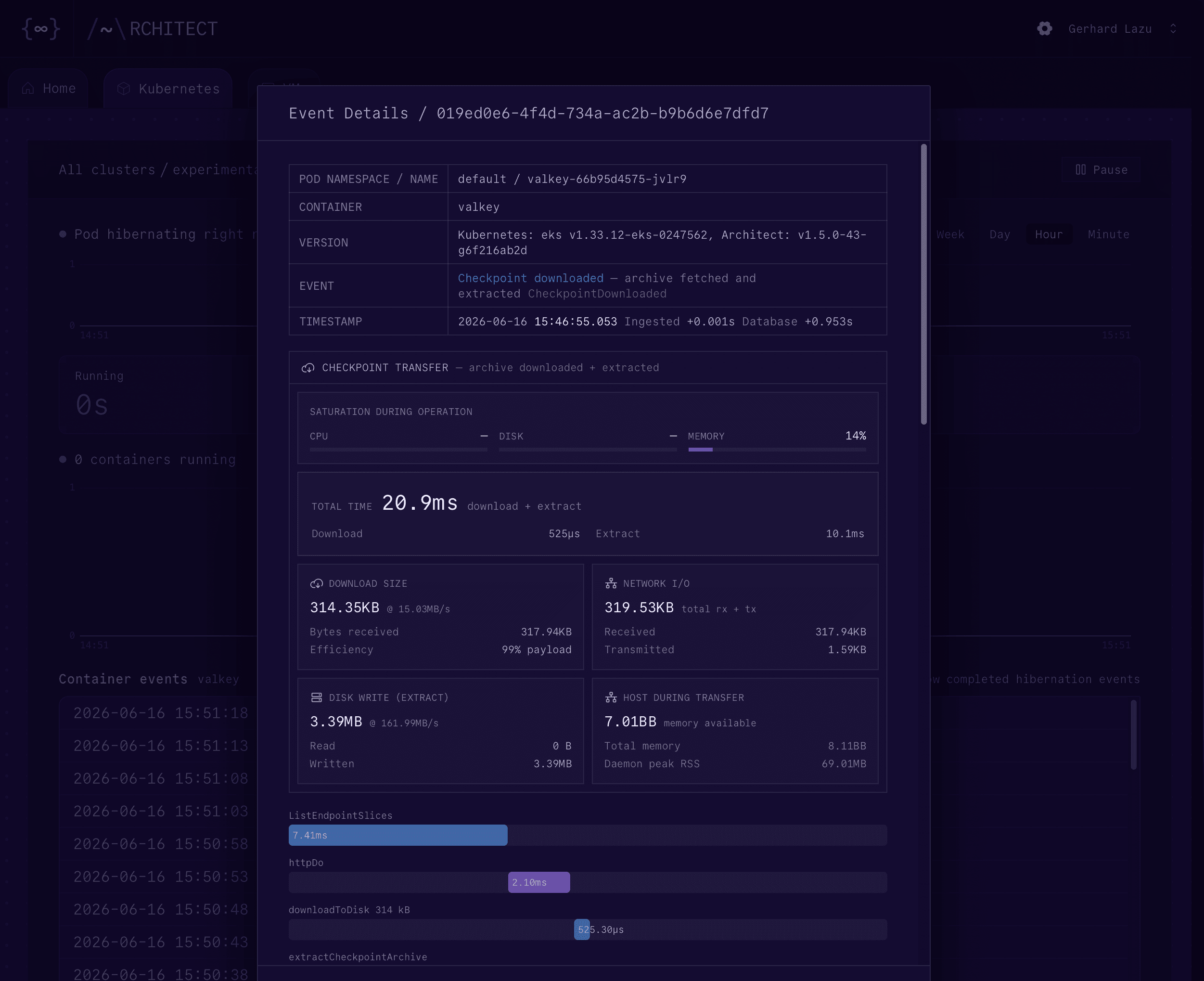
Now let's check that the in-memory data is still there:
valkey-cli HGETALL session:u9f3a
# 1) "user_id"
# 2) "4821"
# 3) "role"
# 4) "admin"
# 5) "last_seen"
# 6) "2026-05-28T14:03:00Z"valkey-cli LRANGE jobs:email 0 -1
# 1) "send-invoice:4819"
# 2) "send-welcome:4821"valkey-cli GET agent:ctx:4821
# "user prefers weekly summaries, timezone UTC+1"The above proves that Valkey migrated across nodes, and it preserved all its in-memory state.
Stateful on spot
Stateful means on-demand. That has been true for as long as losing an instance meant losing everything, and it does not have to be true anymore.
A single Valkey instance on spot, no persistence, no replicas. This is effectively spot pricing with on-demand guarantees. No code changes, one Helm chart, and three annotations that keep the data through the move.
Go look at your cloud bill. Sort by on-demand spend. The biggest line items are almost certainly stateful: session stores, message brokers, databases. All stuck on on-demand because the state cannot disappear. That constraint is now gone.

Author:
gerhard lazu
CTO
Socials: